Novari eRequest is an electronic referral system. You use it to create, receive, review, and manage referrals as part of your role.
Screens, options, and labels may vary by role and local configuration.
Note: The screens and options you see may differ based on your role, your organization’s configuration and/or recent updates to the Novari platform.
Terms and screen labels
In this guide, referral is the standard term for the item that moves through the workflow.
Depending on configuration, you may also see labels such as eRequest, eReferral, requisition, Reject, or Split Pages. These refer to the same referral.
Filters narrow lists so you can focus on specific referrals (for example, by state or date).
Routing tags help filter location options when routing a referral in Awaiting Routing.
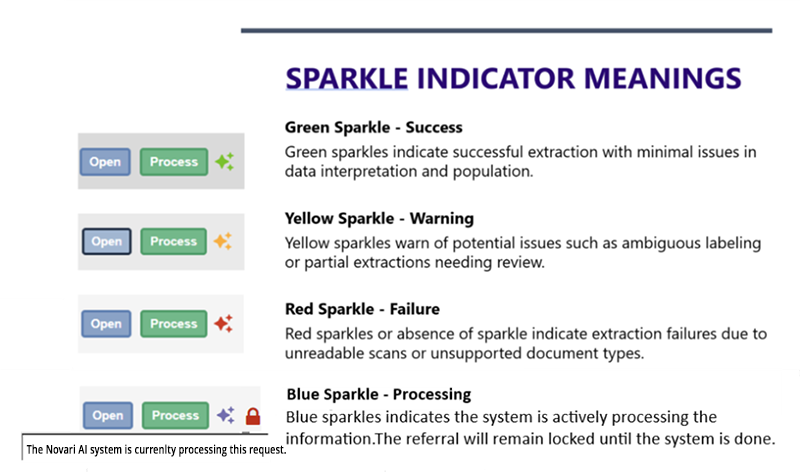
Doc AI
Doc AI scans faxed referral documents and extracts key details (e.g., patient demographics, provider info) to reduce manual data entry.
Users MUST verify all extracted information—Doc AI supports your workflow but never makes decisions.