Use this tab for broad searches across statuses and definitions.
Search
Use the search bar to find a referral within the queue or list you are viewing.
- Enter search text.
- Select the magnifying glass or press Enter.
- Clear your search by selecting X.
Tip: Use an asterisk (*) as a wildcard. Example: ref* finds “referral”, “reference”, etc.
Column filters
- Enter a value in Filter Value, then select Apply Filter.
- Sort ascending or descending from the column menu.
Document history
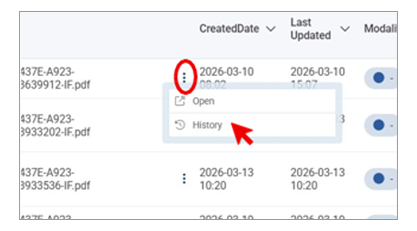
- Use Document History to review actions taken on a referral.
- In a queue or list, open the menu at the end of the file name (three dots).
- Select Document History.
- Filter by user or system actions.
- Download the log if needed.
Quick check (before you submit)
Before you select Submit, confirm:
- Required fields are complete.
- Your corrections match the fax.
- You selected the correct provider or hub (if applicable).
Glossary
Use these terms consistently when you work in the Central Intake Hub.
- Batch Review – Step where you verify the splitting of multi-referral faxes
- Barcode – Unique identifier that links inbound and outbound fax threads for a referral
- Diagnostic Imaging (DI) – MRI and CT services in Stage 1
- Duplicate – Referral that matches an existing referral for the same patient, same service, and within the defined time window
- Service Directory – Provider capability data, including MRI/CT sites, modalities, and specialized exams
- Standardized Referral Form (SRF) – Approved referral form template used for DI referrals
- Central Intake Hub – Browser-based Ricoh platform used to intake, validate, route, and communicate MRI and CT referrals in Stage 1